


Call Analytics for AI Voice Agent Testing
We built analytics because teams kept asking us the same question: "Something changed after our last deploy, but we can't figure out what."
They'd send screenshots of transcripts, hoping we could spot the problem. Sometimes latency had crept up. Sometimes completion rates had dropped. They knew something was wrong - they just couldn't see it in the data they had.
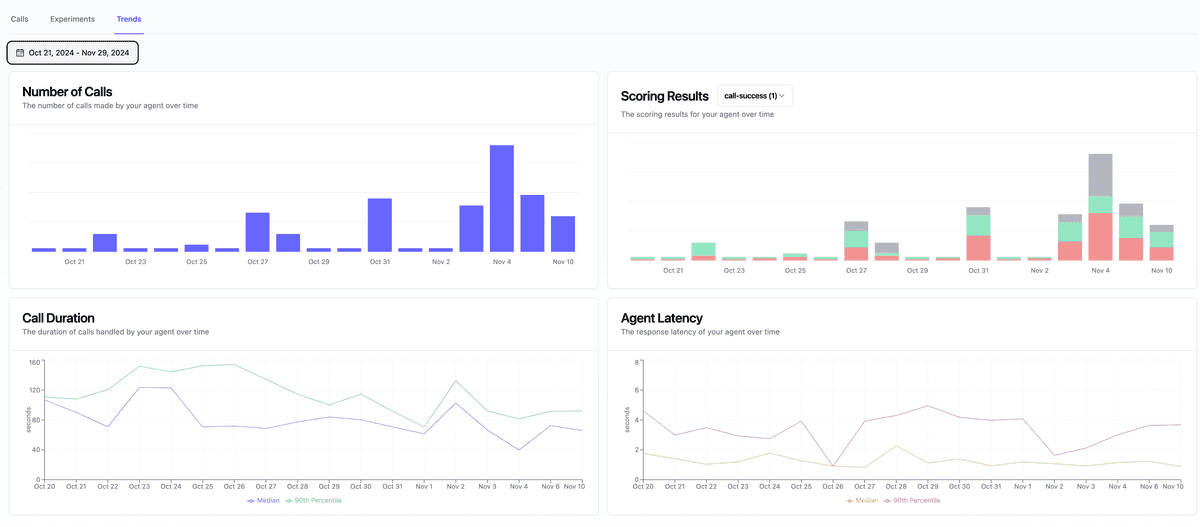
Now you can see it directly. Our new analytics module visualizes performance metrics during automated voice agent testing, so you can answer "what changed?" without digging through logs.
Quick filter: If you can’t answer “what changed after the last release?” from your dashboard, you don’t have call analytics yet.
Comprehensive Performance Metrics during Voice Agent Testing
Track critical metrics like:
- p50 latency measurements (median response time - half of all responses are faster than this)
- p90 latency measurements (90th percentile response time - 90% of responses are faster than this)
- Call duration (average, min, max)
- Scoring metrics (accuracy, completeness, etc.)
| Metric | Question it answers | Why it matters |
|---|---|---|
| Latency p50 | What does a typical user experience? | Reveals baseline responsiveness |
| Latency p90 | How bad is the worst 10%? | Exposes slow calls that hurt CSAT |
| Call duration | Are calls too long or too short? | Detects stalls, loops, or drop-offs |
| Scoring metrics | Did the agent complete the task? | Connects testing to outcomes |
Why this matters
Understanding response times and performance metrics is crucial for delivering exceptional customer experiences with AI voice agents. Slow or inconsistent responses can frustrate users and damage brand reputation. Our analytics module enables you to:
- Optimize User Experience: Monitor and improve response times to ensure natural, fluid conversations
- Reduce Operational Costs: Identify and fix inefficiencies before they impact your bottom line
- Ensure Reliability: Track system stability and catch potential issues early
- Drive Continuous Improvement: Make data-driven decisions to enhance voice agent performance
With comprehensive analytics, you can confidently scale your voice AI operations while maintaining high quality standards. Teams can quickly identify areas for optimization and measure the impact of improvements over time.
We built this after too many teams sent us screenshots of raw transcripts asking, “Can you tell what changed?” Now the dashboard shows it directly.
Getting Started
To begin using the new analytics module:
- Go to Voice Agents and select a voice agent
- Navigate to the 'Trends' section
- Start tracking performance
Looking Forward
This analytics module represents our commitment to providing comprehensive tools for voice AI testing and optimization.
More to come!